Salesforce integration sign-in changes · 2026–2027
Is your Salesforce org affected?
Probably, if anything signs in to Salesforce with a stored password, a rarely used refresh token or an older Connected App. Salesforce is tightening OAuth in stages: idle refresh tokens expire after 30 days from 4 Nov 2026, the username-password flow is retired on 20 Feb 2027, and Connected Apps reach end of support in Summer '27.
Dates checked against Salesforce Help and release notes on .
Next deadline
Idle refresh tokens expire after 30 days (production)
Wed, 4 Nov 2026 · production, scratch & Developer Edition orgs (rolling)
Counts to midnight US Pacific time. Salesforce enforces many of these on a rolling basis, so your org may change on or after this date.
Username-password & user-agent flows retired in about 115 days (20 Feb 2027, no opt-out).
The short answer
What is changing in Salesforce authentication?
Salesforce is retiring the old ways integrations sign in. From 20 February 2027, the OAuth 2.0 username-password flow and the user-agent flows stop working for Connected Apps, with no opt-out. Before that, idle refresh tokens expire after 30 days (production from 4 November 2026), the device flow is limited to local External Client Apps (30 November 2026), and SOAP API login() needs the Use Any API Auth permission (1 December 2026). Connected Apps reach end of support in Summer '27, when SOAP login() is also retired in API versions 31.0–64.0.
The fix for most integrations is to move to an External Client App with a supported server-to-server flow, usually JWT bearer or client credentials, or to Named Credentials for callouts between orgs. Existing Connected Apps keep issuing tokens after Summer '27, but Salesforce stops fixing and supporting them.
Timeline
Every Salesforce authentication deadline, in order
Each date links to the Salesforce page it comes from. Salesforce has moved some of these before, so also check Setup → Release Updates in your own org.
-
Since Spring '26In effect
New Connected Apps can't be created
New Connected Apps can't be created in Setup or via API, including Metadata API, since Spring '26 (except via package install or a Support request). New integrations must use External Client Apps. Existing Connected Apps keep working.
Source: Salesforce Help KA 005228017
-
Sandboxes
Idle refresh tokens expire after 30 days: sandboxes
Rolling enforcement in sandboxes. A refresh token unused for 30 days stops working and the integration must re-authorize. Integrations that don't use refresh tokens get access tokens capped at 30 days from last login.
Source: Salesforce Help KA 005461275
-
Upcoming
Idle refresh tokens expire after 30 days: production
Rolling enforcement in production, scratch and Developer Edition orgs. Monthly, quarterly or yearly jobs that rely on a stored refresh token fail with
invalid_grant. Integrations that don't use refresh tokens get access tokens capped at 30 days from last login.Sources: KA 005461275 · Salesforce security roadmap (KA 005461287)
-
Upcoming
OAuth device flow restricted to local External Client Apps
Only local External Client Apps with a localhost callback and no other OAuth flows enabled may use the device flow. Device-flow requests through Connected Apps and non-compliant External Client Apps are blocked.
Sources: KA 005461280 · Release note
-
Upcoming
SOAP API
login()requires the Use Any API Auth permissionUsers without the permission get
INSUFFICIENT_ACCESSwhen they call SOAPlogin().Source: KA 005132110
-
Sandboxes
SOAP
login()security checks: sandboxesFrom a broad login IP range, SOAP
login()needs a security token or mTLS (otherwiseTOKEN_REQUIRED). A one-time check disables SOAPlogin()in orgs with no SOAPlogin()activity in the previous 6 months.Source: KA 005132110
-
Production
SOAP
login()security checks: productionThe same token and 6-month inactivity rules reach production. Annual, seasonal and disaster-recovery jobs that use SOAP
login()are the ones most likely to be caught.Source: KA 005132110
-
The big one
Username-password and user-agent OAuth flows retired
Token requests with
grant_type=passwordfail withinvalid_grant/ “authentication failure”. Apps using the user-agent or hybrid user-agent flows stop authorizing. There is no opt-out after enforcement.Sources: KA 005461279 · KA 005461282 · Release note
-
Summer '27Day not yet published
Connected Apps end of support · SOAP
login()retired in API 31.0–64.0The “Migrate All Connected Apps to External Client Apps” release update is enforced for production. Connected Apps keep working but are no longer fixed or supported. SOAP
login()stops working in API versions 31.0–64.0 (it's already gone in 65.0+).Sources: Release note · KA 005461287 · KA 005132110
Key facts
Quotable facts, each with its official source
Salesforce retires the OAuth 2.0 username-password flow for Connected Apps on 20 February 2027, with no opt-out after enforcement.
Source: Salesforce Help KA 005461279
Salesforce limits the refresh token idle time to 30 days, enforced on a rolling basis from 21 October 2026 in sandboxes and 4 November 2026 in production.
Source: Salesforce Help KA 005461275
From 30 November 2026, the OAuth 2.0 device flow only works with local External Client Apps.
Source: Salesforce Help KA 005461280
From 1 December 2026, SOAP API
login()requires the Use Any API Auth permission, and it is retired in API versions 31.0–64.0 in Summer '27.Source: Salesforce Help KA 005132110
Connected Apps reach end of support in Summer '27. Existing apps keep working, but Salesforce no longer fixes or supports them.
Source: Winter '27 release note
Since Spring '26, new Connected Apps can't be created in Setup or via API (except via package install or a Support request).
Source: Salesforce Help KA 005228017
60-second self-check
Who is affected?
Your org is affected if any of these is true. Tick what applies. This runs only in your browser: nothing is saved or sent.
What breaks
What actually fails, and what you'll see
These changes don't show a warning banner. An integration simply stops signing in, usually overnight, often in a job nobody has looked at in months.
Rarely used refresh tokens
- What fails
- Integrations that run monthly, quarterly or yearly on a stored refresh token.
- You'll see
invalid_grant/ “expired access/refresh token”. A user has to re-authorize the app.- Direction
- Find low-frequency jobs now; move server-to-server jobs to JWT bearer or client credentials, which don't rely on refresh tokens; they simply request a new token when the old one expires.
Device flow on Connected Apps
- What fails
- CLI tools and devices that sign in with the device flow through a Connected App or a non-compliant External Client App.
- You'll see
- Device-flow requests are blocked; the app is flagged non-compliant.
- Direction
- A local External Client App with a localhost callback and only the device flow enabled.
SOAP API login()
- What fails
- Clients that sign in with SOAP
login(): older data loaders, connectors and scripts. - You'll see
INSUFFICIENT_ACCESS(missing permission),TOKEN_REQUIRED(broad IP range), then no login at all in API 31.0–64.0.- Direction
- Assign Use Any API Auth as a bridge, then move the client to OAuth on an External Client App.
Username-password flow
- What fails
- Anything that posts
grant_type=passwordto/services/oauth2/token: middleware, ETL, scripts, org-to-org Apex. - You'll see
invalid_grant/ “authentication failure”; Login History status “OAuth Username-Password Flow Disabled”.- Direction
- Client credentials (server-to-server) or web server + PKCE (user login) per KA 005461279, or JWT bearer per KA 005132110, on an External Client App. ECAs will never support the password flow.
User-agent & hybrid flows
- What fails
- Browser and mobile apps that use the user-agent or hybrid user-agent flow.
- You'll see
- The app stops authorizing users.
- Direction
- Web server flow (or hybrid web server flow) with PKCE.
Connected Apps
- What fails
- Nothing switches off on the day, but Salesforce stops fixing and supporting Connected Apps and their flows.
- You'll see
- A release update to migrate all Connected Apps to External Client Apps.
- Direction
- Migrate in-house apps (keys, secrets and refresh tokens carry over); chase vendors for managed-package apps.
What does not change
- Existing Connected Apps don't stop issuing tokens in Summer '27. End of support is a risk, not an outage.
- JWT bearer, client credentials and web server flows keep working on Connected Apps and External Client Apps.
- Salesforce's migration tool keeps the consumer key, secret and refresh tokens, so supported integrations don't re-authenticate.
- But moving to an External Client App doesn't rescue a password-based integration: the client itself has to change flow.
Free resource
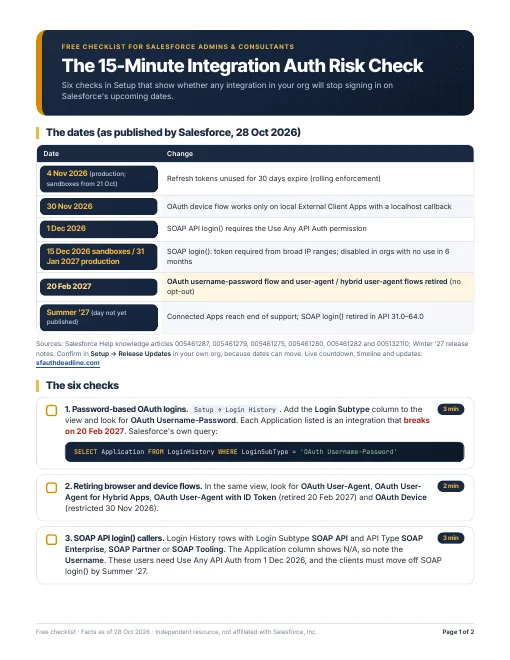
The 15-Minute Integration Auth Risk Check
Six checks in Setup that show whether any integration in your org will stop signing in on Salesforce's upcoming dates. No sign-up, no email: just the PDF.
- Every date on one page, with its Salesforce source
- Exactly where to look: Login History, App Manager, OAuth usage, Release Updates
- What each finding means and which date it maps to
Official Salesforce sources
- Connected App & External Client App Security Requirement Updates (roadmap, KA 005461287)
- Retirement of the OAuth 2.0 Username-Password Flow (KA 005461279)
- Refresh Token Idle TTL Is Limited to 30 Days (KA 005461275)
- OAuth 2.0 Device Flow restriction (KA 005461280)
- User-Agent and Hybrid User-Agent Flows retirement (KA 005461282)
- SOAP API login() Retirement & Security Requirements (KA 005132110)
- New Connected Apps Can No Longer Be Created (KA 005228017)
- Release note: Migrate All Connected Apps to External Client Apps
- Release note: Username-Password Flow Retirement
- Connected App to External Client App Migration
- Block Authorization Flows to Improve Security
- Login History
If you're affected
Want the whole migration mapped out?
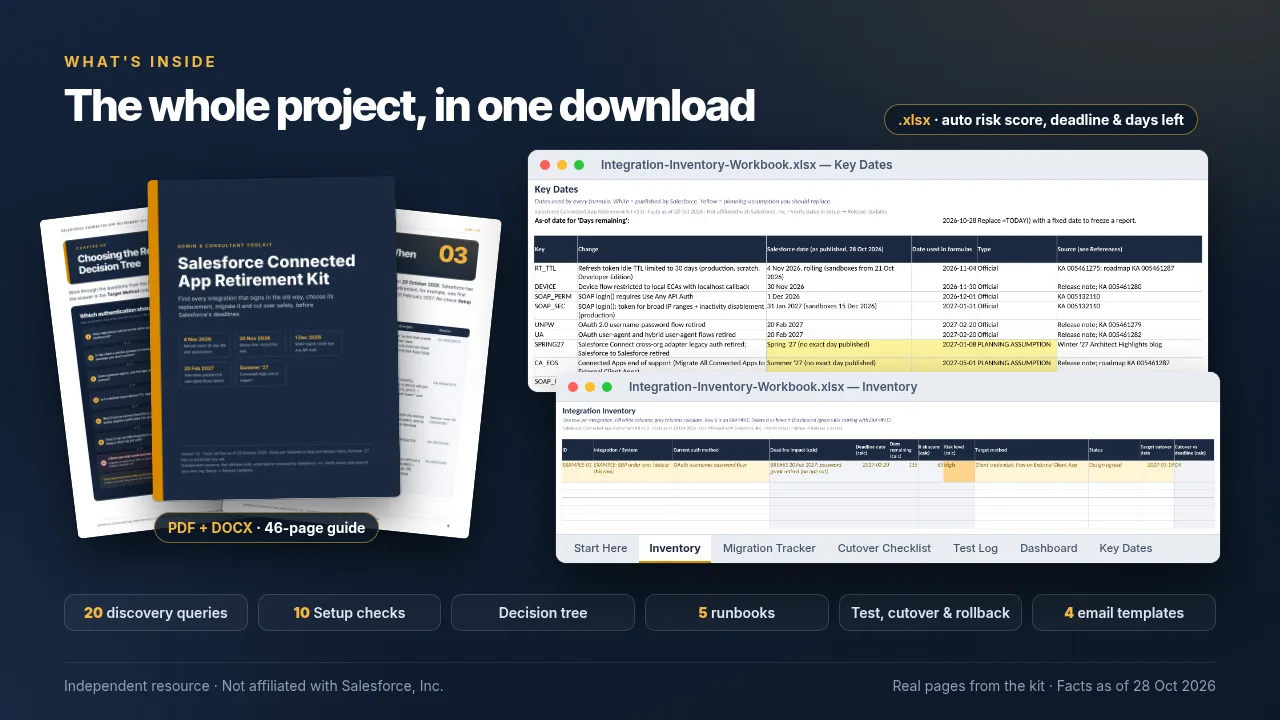
The free checklist tells you whether you're affected. The Connected App Retirement Kit is a self-serve download for doing the work: find every integration, pick its replacement and cut over before 20 February 2027.
- Inventory workbook that scores risk and flags late cutovers
- Discovery queries, Setup checks and a read-only export script
- Decision tree, five runbooks, test/cutover/rollback checklists
- Email templates for owners, vendors and change approval
Independent digital download, sold through Gumroad. Not a service and not affiliated with Salesforce.
FAQ
Frequently asked questions
When does Salesforce retire the OAuth username-password flow?
On 20 February 2027. After enforcement, Connected App integrations that use the username-password flow can no longer get access tokens, and there is no opt-out. Token requests fail with invalid_grant / “authentication failure”. Source: Salesforce Help KA 005461279.
Are Connected Apps going away?
Not on a single day. New Connected Apps can't be created in Setup or via API since Spring '26 (except via package install or a Support request), and Connected Apps reach end of support in Summer '27. Existing Connected Apps keep working after that, but Salesforce no longer fixes bugs or supports them, so the recommended path is to migrate to External Client Apps. Sources: KA 005228017, Winter '27 release note.
What is the 30-day refresh token change?
Salesforce limits refresh token idle time to 30 days. A refresh token that hasn't been used for 30 days expires and the integration has to re-authorize. Enforcement rolls out from 21 October 2026 in sandboxes and 4 November 2026 in production, scratch and Developer Edition orgs. Jobs that run monthly, quarterly or yearly are most at risk. Integrations that don't use refresh tokens get access tokens capped at 30 days from last login; they simply request a new token when the old one expires. Source: KA 005461275.
How do I know if my org is affected?
Check Login History for Login Subtypes OAuth Username-Password, OAuth User-Agent, OAuth Device or SOAP API; check App Manager for apps with App Type Connected; and list any integration that runs less often than every 30 days on a saved refresh token. If any of these turn something up, you're affected. The self-check above and the free checklist walk through it.
What should replace the username-password flow?
For server-to-server integrations, the client credentials flow (KA 005461279) or the OAuth 2.0 JWT bearer flow (KA 005132110) on an External Client App. Client credentials needs your My Domain URL. For end-user login in browser and mobile apps, use the web server flow with PKCE (KA 005461279). For callouts from one Salesforce org to another, use Named Credentials. External Client Apps will never support the username-password flow.
Does migrating a Connected App to an External Client App break existing integrations?
Not for integrations on supported flows. Salesforce's migration keeps the consumer key, consumer secret and refresh tokens, so those integrations don't need to re-authenticate. It does not rescue an integration that uses the username-password flow: that client has to switch to a supported flow first. Source: Connected App to External Client App Migration.
What happens to SOAP API login()?
From 1 December 2026 it requires the Use Any API Auth permission. From 15 December 2026 (sandboxes) and 31 January 2027 (production), logins from broad IP ranges need a security token or mTLS, and SOAP login() is disabled in orgs that haven't used it in 6 months. In Summer '27 it is retired in API versions 31.0–64.0. Source: KA 005132110.
What about apps from managed packages and vendors?
Salesforce says it's the package vendor's responsibility to provide a migrated External Client App version. Find those apps in App Manager now and ask each vendor for their date, since you can't fix their app yourself. Source: KA 005228017.
Is this site affiliated with Salesforce?
No. It's an independent resource that summarizes Salesforce's public documentation and links to it for every date. If Salesforce's pages and this site disagree, Salesforce's pages win.